
Any list on a webpage, as a clean spreadsheet
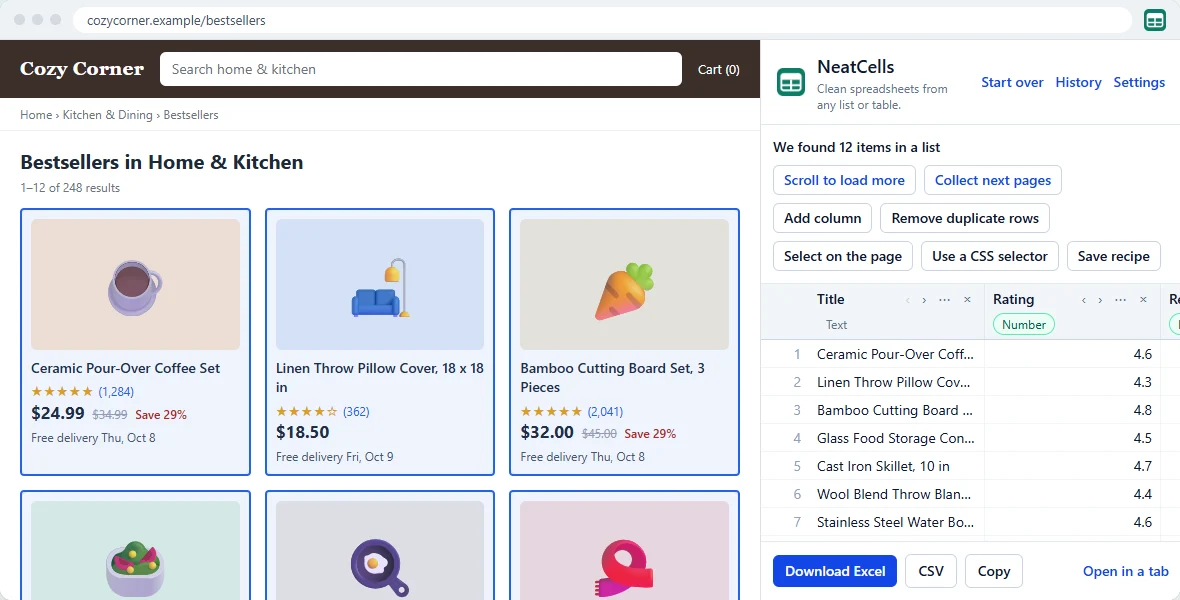
NeatCells finds the table, product list or search results on the page you are viewing and turns it into a tidy Excel or CSV file, with real numbers, dates and column names you would have chosen yourself.
Free · No account · Pages and data stay on your computer
What makes it different
Finds the data by itself
Tables, product cards, search results, feeds that load as you scroll, and the structured data many pages carry. Not the list you wanted? Point at one item and every item like it is found.
Columns with real names
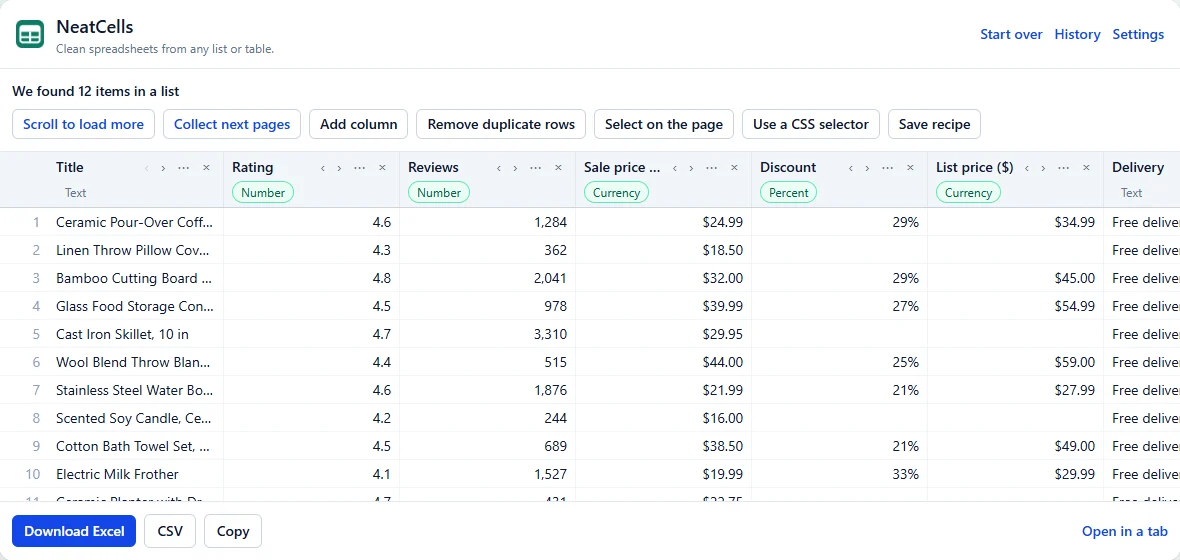
Title, Price, Rating, Reviews, Date, Company, Location: named from what the values are, not "div-3". Icons, buttons and empty columns are left out.
Numbers that add up
"4.6 out of 5 stars" becomes 4.6, "(1,284)" becomes 1284 and "₹1,23,456" becomes 123456, with the currency in the column name. Dates are real dates in Excel.
Private by design
NeatCells reads a page only when you click its icon there. The pages you read and the data you collect never leave your computer, and there is nothing to sign up for.
How it works
- Open the page with the list or table you want, such as search results or a product category.
- Click the NeatCells icon or press Alt+Shift+E. The panel shows what it found as a table you can rename, reorder and trim.
- Click Download Excel, CSV or Copy. Done: a sheet with a header row, filters and the right types.
Works on the pages you use
- Search results
- Product listings
- Directories
- Job boards
- Property listings
- Rankings and leaderboards
- Data tables and grids
- Feeds that load as you scroll
- Lists spread over several pages
Free, with Pro for repeat work
Free
- Every row on the page you are on
- Items that load as you scroll
- Up to 5 pages per run
- Excel, CSV and copy to clipboard
- 1 saved recipe
Pro
- Up to 500 pages per run
- Unlimited saved recipes, and watching them for new and changed rows
- Split, merge, find and replace (patterns too), and set column types
- Details from each item's own page
Questions
Is NeatCells free?
Yes. The free version has no row limit on the page you are on, collects items that load as you scroll, follows up to 5 pages per run, and saves Excel, CSV and copied tables. NeatCells Pro adds bigger multi-page runs, more saved recipes and extra tools for people who do this every week.
Which websites does it work on?
Pages that show a list or a table: search results, product listings, directories, job boards, property listings, rankings, data tables and grids. If the list is not found by itself, click "Select on the page" and then one item, and every item like it is found. Chrome does not let extensions read its own pages or the Chrome Web Store.
Are the pages I read or the data I collect sent anywhere?
No. NeatCells reads the page in your browser, and files are saved straight to your computer. There is no account and nothing is uploaded. The privacy policy lists the few things that ever leave your computer, such as a Pro license check.
Why not just copy and paste the table?
Pasting keeps the page's text: "4.6 out of 5 stars", "₹1,23,456", "(1,284)". NeatCells turns those into real numbers, dates and links, names the columns, and leaves out icons, buttons and empty columns, so the sheet sorts, filters and adds up.
Do I need an account?
No. Install the extension and use it. Pro is unlocked with a license key you get by email after buying, also without an account.
Is it allowed to collect data from websites?
NeatCells reads only what you can already see in your own browser, at your request. Some websites' terms limit automated collection, and data about people is protected by privacy laws, so use what you collect responsibly. Multi-page runs wait between pages and stop at any CAPTCHA or sign-in page.